


Frequently Asked Questions
Quick answers about ordering, billing, access and the applications included with your seedbox.
Showing 21 questions
💳 Ordering & Billing 9
Which payment methods do you accept?
We accept PayPal and debit/credit cards.
We don't accept cryptocurrency.
Which currencies do you accept?
You can pay in GBP, EUR or USD.
Can I pay for more than one month at a time?
Yes. You can pay monthly, every three months, every six months or yearly.
Paying yearly saves you 15%.
Are you running any promotions?
Yes. Use this code at checkout to get 50% off your first month:
DEDI50%
Can I add a promo code after my order has been paid?
No. Promo codes must be entered during checkout, before you pay.
How long does setup take?
Seedbox and VPS plans are set up instantly.
Setup time for dedicated servers depends on hardware availability.
Why was my order marked as fraud?
Orders are checked automatically and will be rejected if:
- The country on your account doesn't match the location of your IP address.
- You ordered while using a VPN, TOR or a proxy. Please disconnect before ordering. You can use a VPN again once your service is active.
- You used a disposable email address. (Legitimate email forwarding services are fine.)
Because of high chargeback rates, we can't accept orders from some countries, including China, Vietnam, Brazil, Honduras, Bangladesh, Peru, Egypt and Iran. Other countries may also be restricted if their chargeback rates are too high.
Do you provide refunds?
If you've requested a cancellation but forgot to cancel your PayPal subscription, let us know and we'll refund the payment straight away.
If you're unhappy with the service within the first seven days, we can refund you. The refund is reduced by the days you've used and by any transaction fee we're charged to process it.
To request a refund, open a support ticket and tell us why you want to cancel.
After a refund, we won't accept a new order from you for one year.
How do I cancel?
You can request a cancellation in the client area:
- Go to Services > My Services.
- Click the green Active button.
- Click the red Request Cancellation button.
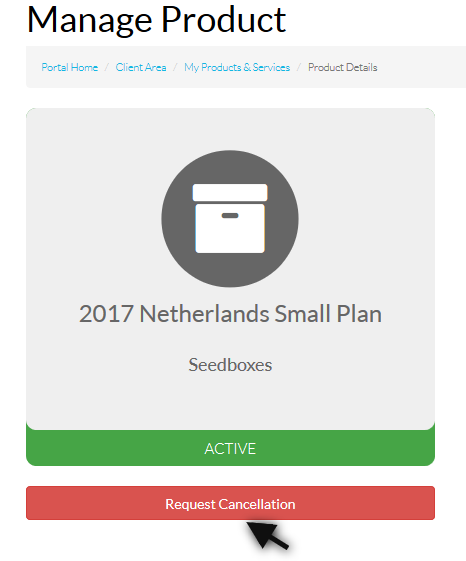
If you pay by PayPal subscription, you also need to cancel the subscription on the PayPal website.
🔑 Features & Access 7
Do you allow public trackers?
You can download from public trackers, but seeding (uploading) to them is restricted in both ruTorrent and qBittorrent.
Uploads to public torrents are limited to 1 KB/s, and these torrents stop automatically once the download finishes.
Do you provide SSH access?
Yes, but SSH access is non-root, so you can't install applications or run cron jobs.
You can use these tools over SSH: rclone, rsync, mktorrent, rar/unrar, iperf3, SFTP and LFTP.
To get started, see Installing SSH.
Do you provide desktop access?
No, we don't provide desktop access through VNC or X2Go.
Do you offer dedicated IP addresses?
Dedicated IP addresses are only available with a VPS or dedicated server.
Can I set up additional FTP accounts?
No, our seedbox service doesn't support additional FTP accounts.
How fast can I download from your servers to my computer?
Your download speed depends on many factors, so we suggest testing it before you order.
To test it, download this file in your browser:
Can you transfer my data from another provider?
We can't transfer your data for you, but you can move it yourself using Resilio Sync (if your current provider offers it) or rsync over SSH.
📦 Applications & Clients 5
Which torrent clients do you support?
We offer rTorrent 0.16.23 with ruTorrent 5.2.15, and qBittorrent 5.2.4.
Can I edit the rTorrent config?
No. The .rtorrent.rc config file isn't accessible, and we can't make changes to it on your behalf.
Do you offer full Plex access?
Yes, you get full Plex server access. See the Plex guide to get started.
Do you support Rclone?
Yes. You can transfer files with rclone and mount rclone drives. See Rclone and Rclone Mount.
Which applications do you offer?
Every seedbox plan includes 51 applications you can install in one click from the client area:
Streaming
 Plex
Plex
Organise and stream your personal media collection from anywhere. Emby
Emby
Flexible personal media streaming with a clean, modern interface. Jellyfin
Free open-source media server — no subscriptions, no limits. Airsonic
Self-hosted music streaming server accessible from any device. Navidrome
Modern, lightweight music server compatible with Subsonic and Airsonic apps. Audiobookshelf
Manage and stream your personal audiobook and podcast library. Booksonic
Open-source audiobook server — stream your collection from anywhere.
Media Management
 Sonarr
Automated TV show downloader with calendar and episode tracking. Radarr
Movie collection manager with automatic downloading and upgrades. Lidarr
Music library manager with automatic downloads and artist tracking. Readarr
Ebook and audiobook collection manager with automated downloading. Mylar
Mylar
Automated comic book downloader and library organiser. Lazylibrarian
Automated book downloader that follows your favourite authors. Bazarr
Automatically download and manage subtitles for your media. Tautulli
Monitoring and tracking tool with detailed statistics for Plex. Jellystat
Statistics and monitoring dashboard for your Jellyfin media server. Headphones
Automated music downloader that keeps your library up to date. Handbrake
Powerful free video transcoder for converting media files. MKVToolNix
Create, inspect and modify Matroska (MKV) container files. Kavita
Fast, feature-rich library system for ebooks and manga.
Download Clients
 ruTorrent
Full-featured web-based front-end for the rTorrent client. qBittorrent
Free, open-source torrent client with a clean web UI. Sabnzbd
Fast, reliable open-source Usenet download client. NZBGet
Efficient Usenet downloader optimised for low resource use. Pyload
Free download manager for file-hosting services. JDownloader 2
Free download manager with link decryption and automation.
Indexers & Automation
 Jackett
Unified proxy API connecting your apps to 400+ torrent trackers. Prowlarr
Modern indexer manager and proxy that integrates with Sonarr, Radarr and more. Nzbhydra2
Meta search engine for NZB indexers with smart duplicate detection. Autobrr
Modern automation tool for torrent racing and filtering. CouchPotato
Automatic movie downloader — add movies to your wishlist and it fetches them. Sickgear
Advanced automatic video library manager for TV shows.- Sickbeard
Original automated TV show downloader and library manager.  Sickchill
Automatic video library manager and TV show downloader. Medusa
Automated TV show manager and downloader built on SickBeard.
Requests & Dashboard
 Overseerr
Media request and management tool for Plex. Jellyseerr
Media request and management for Jellyfin and Emby.- Seerr
Lightweight media request tool for managing content across your servers.  Ombi
Ombi
Let users request media for Plex, Emby or Jellyfin easily. Requestrr
Discord bot for submitting media requests to Radarr and Sonarr. Organizr
Single dashboard for all your self-hosted apps and services.
VPN & Network
 WireGuard
Fast, modern VPN protocol with simple configuration and strong security. OpenVPN
Trusted, widely supported VPN available on all major platforms. SSH
SSH
Secure shell access for remote server management and tunnelling. Lounge
Self-hosted, always-on web-based IRC client. ZNC
ZNC
Open-source IRC bouncer that keeps you connected 24/7.
File Management
 Filebrowser
Web-based file manager with sharing and user management. Syncthing
Peer-to-peer continuous file sync between your devices. Rclone
Sync and transfer files between your seedbox and cloud storage. Resilio
Fast, secure peer-to-peer file synchronisation. Pydio
Pydio
Enterprise-grade file sharing and synchronisation platform.
Linked names have a setup guide in our guides. See them all on the Applications page.
No questions match your search. Try another word, or ask our support team.
Still have a question?
Our support team is happy to help. Open a ticket, or browse our step-by-step setup guides.